Marketing Bot · Campaigns
Reach thousands on WhatsApp and Telegram
Marketing Bot campaigns are a WhatsApp broadcast and Telegram messaging tool in Qyx. Write the message or let the Marketing Agent draft it, pick your contacts and send it now or at a set time.
- WhatsApp and Telegram campaigns
- Marketing Agent drafts copy, audience and timing
- Personal placeholders and AI images
- CSV import with column mapping
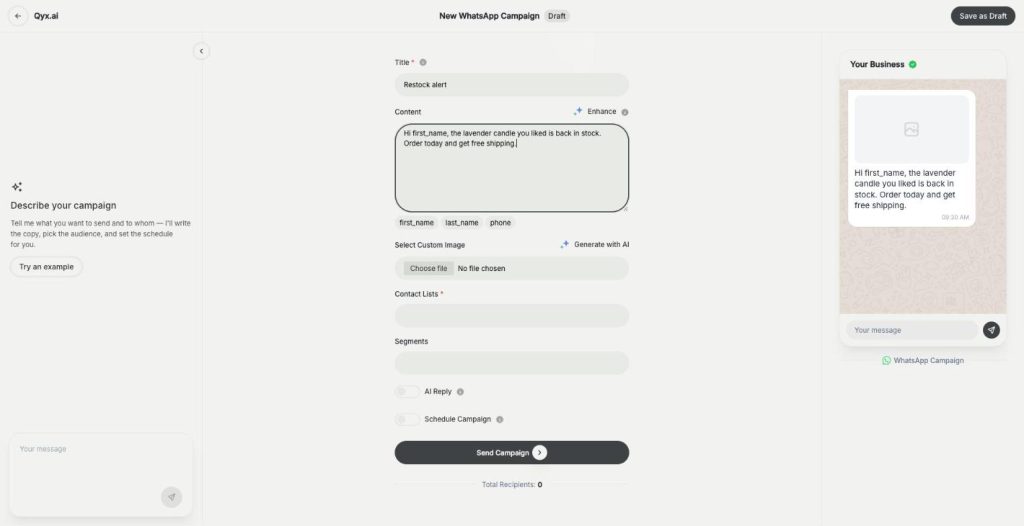
Describe the campaign or write it yourself.
- Official Meta WhatsApp API or Twilio
- Scheduled or instant sending
- Cancel anytime
Emails get ignored
Your customers read their chats every day, and your newsletter waits in a promotions tab.
I send promotions one chat at a time from my phone.
My contacts sit in a spreadsheet nobody uses.
I never know when the best moment to send is.
One place for chat campaigns:
- WhatsApp broadcast
- Telegram campaigns
- Marketing Agent
- Contact lists and segments
- CSV import
- Scheduling
How It Works
A simple three-step process, start to finish.
-
Connect the channels
Add your WhatsApp provider and Telegram token in Settings.
-
Build the campaign
Write the message, add an image and pick the contact lists.
-
Send or schedule
Send it now or set a date and time.
Why shops run a WhatsApp broadcast
Messages land where customers already chat.
Personal greetings without manual typing.
One dashboard for both messaging apps.
Good to know before you start
Campaigns in Marketing Bot let you send a WhatsApp broadcast or a Telegram campaign to your contacts from Qyx. You write one message, choose who gets it, and Marketing Bot sends it to every recipient, now or at a time you set.
How a WhatsApp broadcast is built
Every new campaign starts with the Marketing Agent. Describe what you want to send and to whom, and it writes the copy, picks the audience and sets the schedule. You can also fill the form yourself: a title, the message, contact lists and segments. Enhance improves your text with AI. The placeholders first_name, last_name and phone make each message personal. Add your own image or generate one with AI. A preview on the right shows how the message will look in the chat, with the total number of recipients below.
Telegram campaigns
Telegram campaigns use the same Marketing Agent and the same Enhance button, sent to your Telegram contact lists. The Telegram Groups page lists the groups of your bot, and Telegram Subscribers holds the people who follow it.
Contacts and imports
Add contacts one by one or import a CSV file. For WhatsApp you map columns to name, phone and an optional country code. For Telegram you map name or username, plus an optional phone. A preview shows how many contacts will be imported and how many rows are skipped. Contacts go into lists, and segments narrow them further.
Connecting WhatsApp and Telegram
WhatsApp works through the official Meta WhatsApp API, with an access token, a phone number ID and a WABA ID, or through Twilio, which also offers a sandbox for testing. Telegram needs the access token of your bot. You add both once in Marketing Bot Settings. The dashboard then counts all, scheduled and published campaigns next to your total contacts.
Rules for a WhatsApp broadcast that works
Send only to people who agreed to hear from you, and offer an easy way out. One clear offer and one link beat a long text. Pick moments that matter, such as a restock, a launch or a personal discount. To answer replies automatically, turn on AI bot replies, and read every conversation in the Inbox.
Questions, answered
They are WhatsApp broadcasts and Telegram campaigns you write, target and schedule in Qyx Marketing Bot.
Yes. The Marketing Agent drafts the copy, picks the audience and sets the schedule from your description.
Through the official Meta WhatsApp API or through Twilio, in Marketing Bot Settings.
Yes. Upload a CSV file and map the columns to name and phone for WhatsApp, or name or username for Telegram.
Yes. Turn on Schedule Campaign and pick the date and time, or send it right away.
More Marketing Bot features
-
AI bot replies
Let AI answer when customers reply
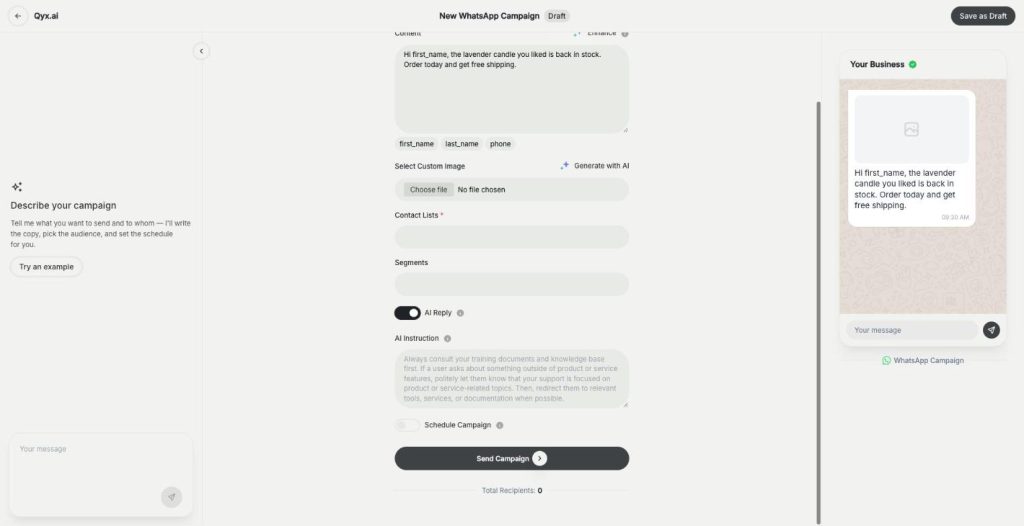
AI bot replies add a WhatsApp auto reply to your Marketing Bot campaigns. Turn on AI Reply, tell the bot how to answer, and it responds to every customer who writes back.
-
Inbox
All campaign chats in one inbox
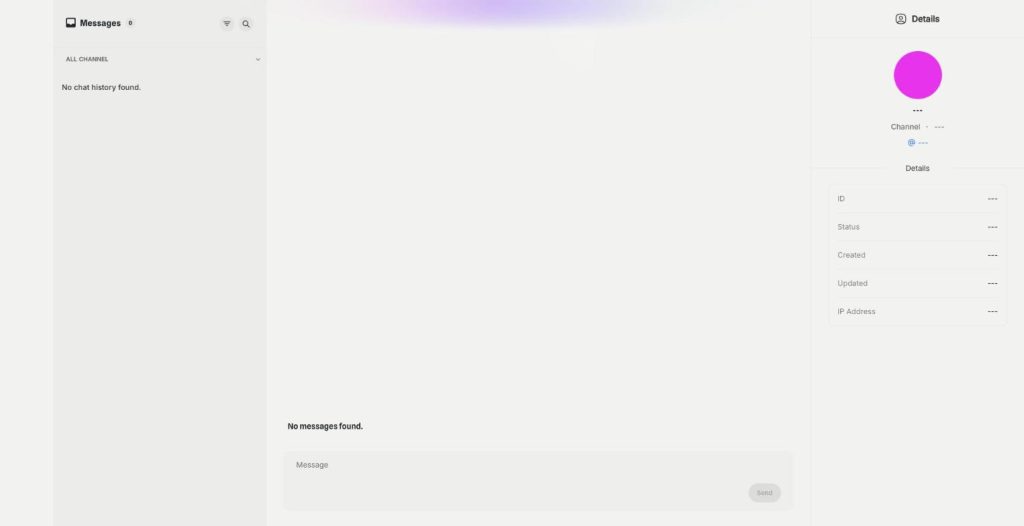
The Marketing Bot Inbox is a WhatsApp inbox and Telegram inbox in one place. Read every reply to your campaigns, filter by channel, search the messages and answer customers yourself.
Send your next campaign where customers chat
From $29/month · 7-day money-back guarantee · Cancel anytime