URL to Video Ad
Turn any product link into a video ad
Paste a product URL and get a ready-to-run video ad for Reels, TikTok and Shorts. Qyx reads the product images and details, then you pick the script, avatar, voice and captions.
- Works with Amazon, Shopify, Etsy and more
- Write the script or let AI write it
- Pick an avatar and a voice
- Made for Reels, TikTok and Shorts
Works from one link. No AI skills needed.
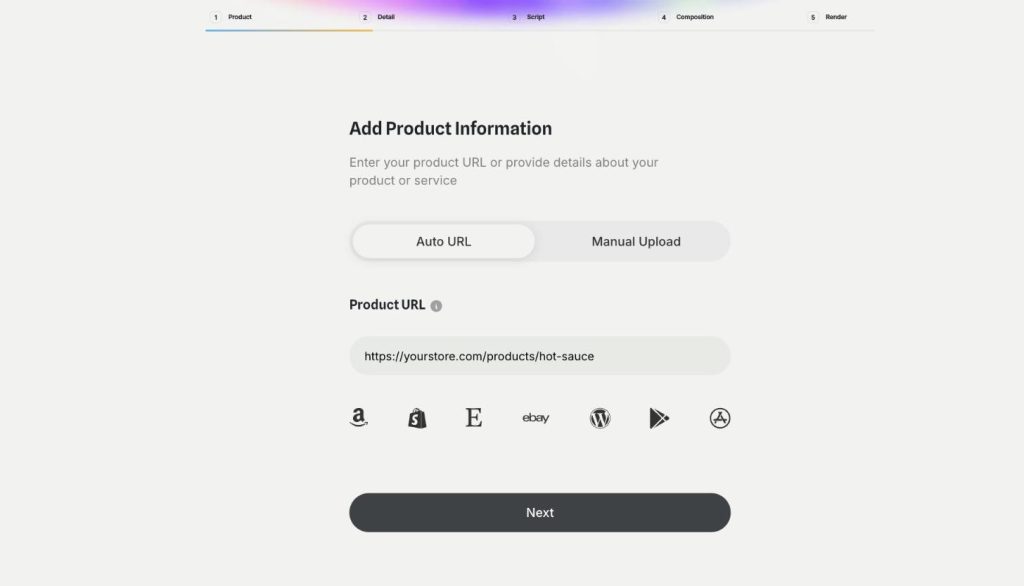
- Links from dozens of store platforms
- No camera or editor needed
- Cancel anytime
Great products, no video ads
You want a video ad for each product, and filming one per product doesn't fit your week.
I know video ads work, but I have no time to film.
Every new product means another shoot and another edit.
My ads run the same tired photo for months.
One place to turn product pages into ads:
- Product link to video ad
- Manual upload for offline products
- AI-written or your own script
- Avatars and voiceovers
- Music and captions
- Language and length settings
How It Works
Three steps, start to finish.
-
Paste your product link
Or switch to Manual Upload and add your own product images.
-
Set up your ad
Pick the script, avatar, voice, captions, language and length.
-
Render and download
Preview the ad and download the video file.
Why sellers use URL to Video Ad
Give every product in your catalog a video ad, including the slow sellers.
Make fresh versions to test when an ad stops performing.
Skip the camera and the editing software.
Good to know before you start
URL to Video Ad is a Qyx tool that turns a product page link into a short video ad for Instagram Reels, TikTok and YouTube Shorts. You paste the link and Qyx builds the first version of the ad for you to adjust.
Where Qyx gets the product details
Qyx accepts product links from Amazon, Shopify, Etsy, eBay, WordPress, Google Play, the App Store and dozens of other e-commerce platforms. It fetches the product name, images and description from that page, so the ad starts from the copy and photos you already published. When the product is not online yet, switch to Manual Upload and add your own images and details. You can also upload extra assets of your own to give the video more material.
What you set before the render
The ad goes through five steps in Qyx: Product, Detail, Script, Composition and Render. You choose the language and the length of the video. You write the script yourself or let AI draft it from the product page. Then you pick the avatar who presents the product and the voice that reads the script, and you add music and a caption style. When the render finishes, you preview the ad and download the video file.
When to use it
You can use it to test several ads for one product or to replace an ad that stopped performing. Change the script, the avatar or the opening line, and you get a new version to run next to the old one in your ad account. You can also give products outside your bestseller list their own video instead of a static photo.
What to prepare
The ad can only use what your product page says. Before you paste the link, check that the page has clear photos, a specific title and a description that explains what the product does and who it is for. If a detail matters to your buyers, such as size, material or delivery time, make sure the page states it correctly, because the AI script draws on that text.
Other Qyx tools for the same product
UGC Factory makes creator-style videos with AI actors or your own digital twin. AI Video Pro animates a single product photo. AI Captions adds styled captions to vertical videos.
Before an ad goes live
Watch each ad and check every claim in the script against your product page. You are the advertiser, so the final check is yours. Platforms such as Meta and TikTok may ask you to label AI-generated content, so read their rules before you upload. To see the whole process on one product, read Turn a link into a video ad.
Questions, answered
URL to Video Ad works with product links from Amazon, Shopify, Etsy, eBay, WordPress, Google Play, the App Store and dozens of other e-commerce platforms.
Switch to Manual Upload and add your own product images and details. Qyx builds the ad from those.
Yes. You can write the script yourself or let AI write it from your product page.
The ads are made for vertical short-form video: Instagram Reels, TikTok or YouTube Shorts. You download the video and upload it to your ad account like any other creative.
No. If you can copy a product link, you can make a video ad with Qyx.
Turn your next product link into a video ad
From $29/month · 7-day money-back guarantee · Cancel anytime