UGC Factory
UGC videos with AI actors, no creators needed
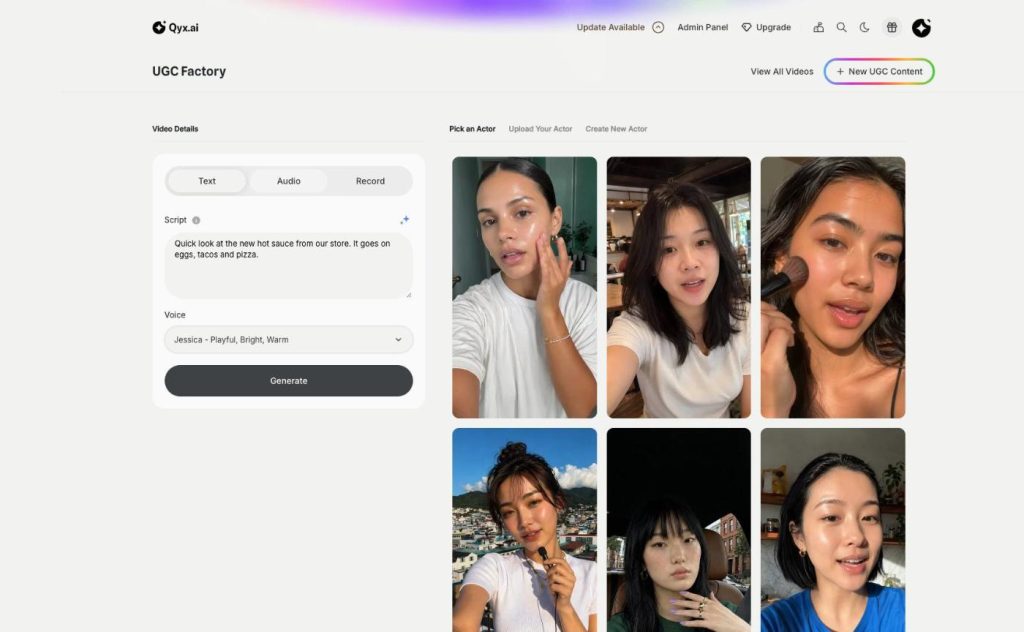
UGC Factory is the AI UGC video generator in Qyx. Pick an AI actor or upload your photo, type the script, and choose an AI voice or your own.
- Ready AI actors in everyday settings
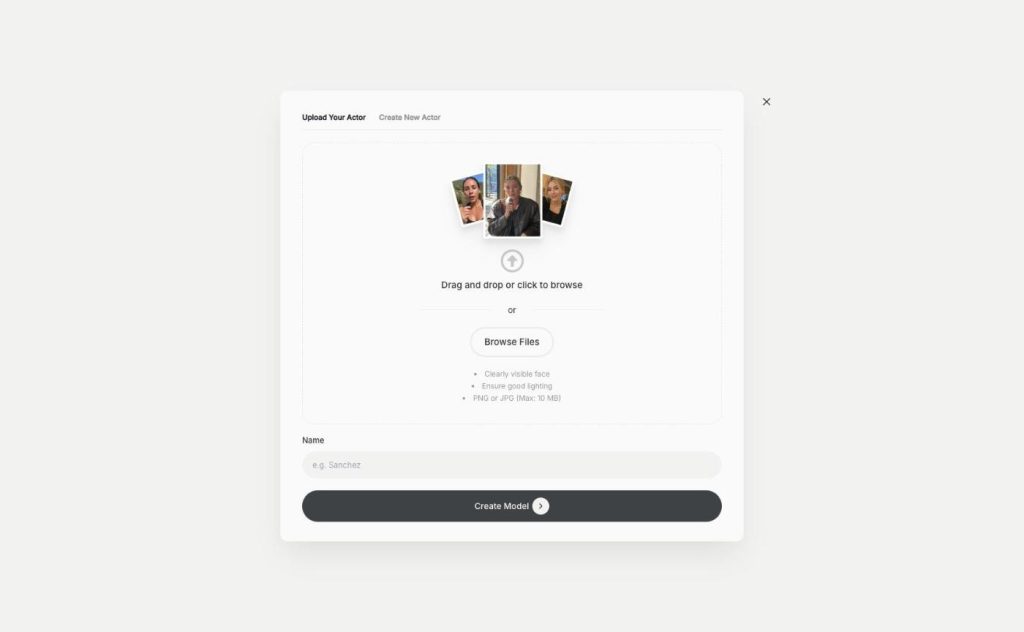
- Your photo as a digital twin
- Type, upload or record the voiceover
- 21 AI voices with preview
Write the script, and the AI actor says it.
- No creators to book or brief
- No camera or studio needed
- Cancel anytime
Creator videos cost too much
UGC ads work, but paying a creator for every product and every new hook eats the budget fast.
Every creator video means a brief, a fee and a week of waiting.
I want to test new hooks, but each one needs a new shoot.
I don't want to be on camera myself.
One place to make UGC videos:
- Ready AI actors
- Your own digital twin
- New actors from a description
- AI help with the script
- Typed, uploaded or recorded voice
- All videos in one library
From script to UGC video
Pick a function to see how it works.
-
UGC Videos
Authentic UGC videos, no creators needed
UGC video maker in Qyx turns a script into a talking-to-camera video. Choose an AI actor, type what they say, and pick an AI voice, your own audio or a recording.
-
AI Actors
Your own cast of AI actors
AI actors in Qyx give your UGC videos a face without casting. Pick one of 21 ready actors, describe a new one, or turn your own photo into a digital twin.
How It Works
A simple three-step process, start to finish.
-
Choose your actor
Pick a ready actor, upload your photo or describe a new one.
-
Add the voice
Type the script and pick an AI voice, or upload audio or record it in the browser.
-
Generate the video
Qyx renders the video, and you find it under View All Videos.
Why sellers use UGC Factory
Test a new hook without booking a new creator.
Keep the same face across a whole campaign.
Give products that never had a video their own UGC clip.
Good to know before you start
UGC Factory is the AI UGC video tool in Qyx. It makes UGC-style videos with AI actors. UGC means user-generated content: short videos where a person talks to the camera about a product. You choose the actor, write what they say and pick the voice, and Qyx renders the video for your ads and social media.
Three ways to get an actor
Pick an Actor shows ready AI actors in everyday settings, for example in a café, a kitchen, a car, a gym or a home office. Upload Your Actor turns your own photo into a digital twin. Use a PNG or JPG up to 10 MB with a clearly visible face and good lighting, give the actor a name and click Create Model. Create New Actor builds an actor from a name and a written description of their appearance and setting.
Script and voice for each AI UGC video
The script field asks what you want your character to say, and the sparkle button lets AI help with the text. With Text, an AI voice reads your script. Qyx offers 21 voices, such as Jessica or Daniel, and you can play a preview of each one before you choose. With Audio, you upload your own voiceover file. With Record, you speak into your microphone in the browser.
Where the videos go
Run the videos as UGC ads on Meta or TikTok, or post them on your store and social accounts. To add styled captions, open the video in AI Captions. To cut it together with other clips, use AI Video Editor. If the actor should hold your real product, UGC Creator builds the scene from your product photos.
Write an AI UGC video script that sounds spoken
UGC works when it sounds like a real person talking to a friend. Start with the problem your product solves and give one concrete detail about it. End with what the viewer should do next. Read the script out loud before you generate. If a line is hard to say, it will sound stiff in the video too. Make two versions with different first lines to see which hook holds attention. For a full walkthrough, read Create UGC videos without creators.
Before a video goes live
Check every claim the actor makes against your product page, because you are the advertiser. For a digital twin, use only photos of yourself or of people who agreed to it. Meta and TikTok may ask you to label AI-generated content, so read their rules before you upload.
Questions, answered
UGC Factory is a Qyx tool that makes UGC-style videos with AI actors. The actor says your script in an AI voice or in your own voice.
Yes. Upload a clear photo of yourself under Upload Your Actor, and Qyx creates a digital twin that speaks your script.
Yes. Upload an audio file or record your voice in the browser instead of using an AI voice.
UGC Factory has 21 AI voices, and you can play a preview of each one. You can also use your own recording.
No. You choose the actor, type the script and pick the voice, and Qyx renders the video.
Make your first UGC video with an AI actor
From $29/month · 7-day money-back guarantee · Cancel anytime