Creative Suite
Design ads and creatives in one place
Creative Suite is the AI design tool in Qyx. Describe a post or an ad and get an editable design, or build one yourself on a canvas with templates, text and layers.
- Editable designs from a text prompt
- Infinite canvas with layers
- Preset sizes for social media and ads
- Annotation Mode for precise AI edits
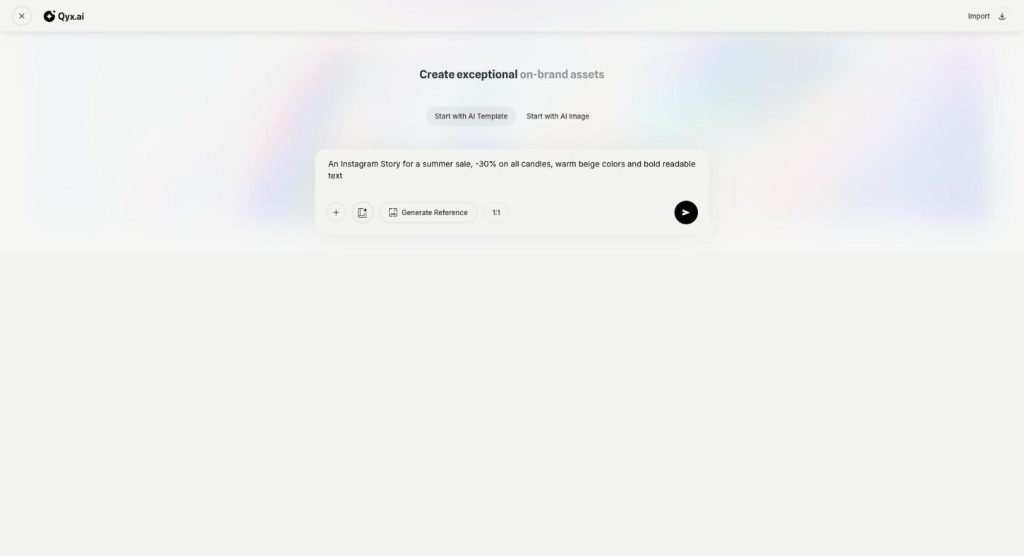
Describe the design or start from a template.
- No design software to learn
- Works in your browser
- Cancel anytime
Every campaign needs ten more sizes
One promotion needs a story, a feed post, a banner and an ad, and each one goes back to the designer.
I wait for a designer every time I need a new banner.
Resizing one ad for every platform takes me hours.
AI images come out almost right, and I can't fix one small part.
One place for marketing design:
- AI Designer
- Infinite canvas
- Templates
- Preset ad sizes
- Annotation Mode
- Export and download
Everything in Creative Suite
Pick a function to see how it works.
-
Canvas
Design ads and creatives on one canvas
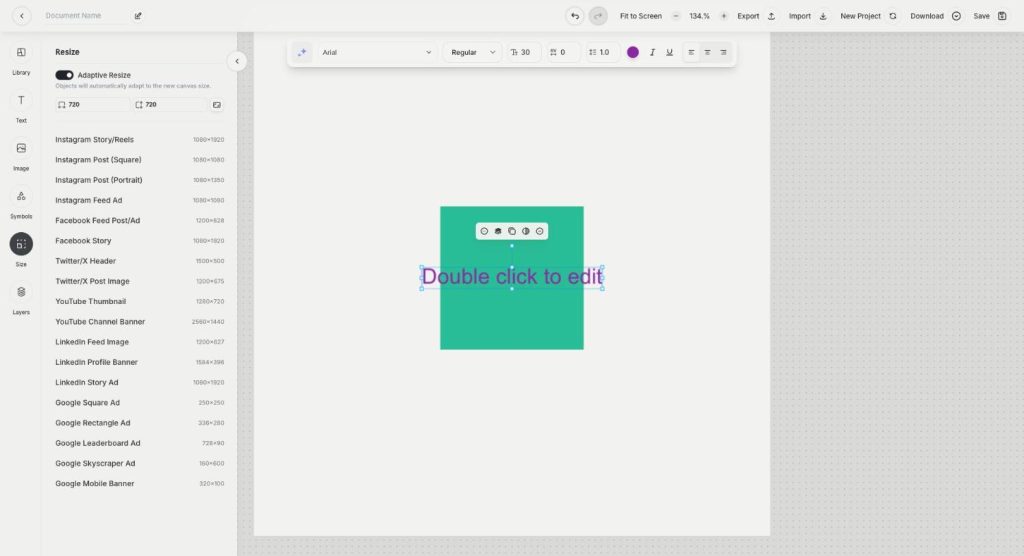
Canvas in Qyx Creative Suite is an online ad maker for social posts, banners and ads. Pick a template or a preset size, add text, images and symbols, arrange layers and export.
-
AI Designer
Describe a design and get it editable
AI Designer in Qyx is an AI graphic designer for marketing creatives. Describe the post or ad you need, and get a finished design with layout, text and images that you can still edit.
-
Annotation Mode
Point at an image, tell AI what to fix
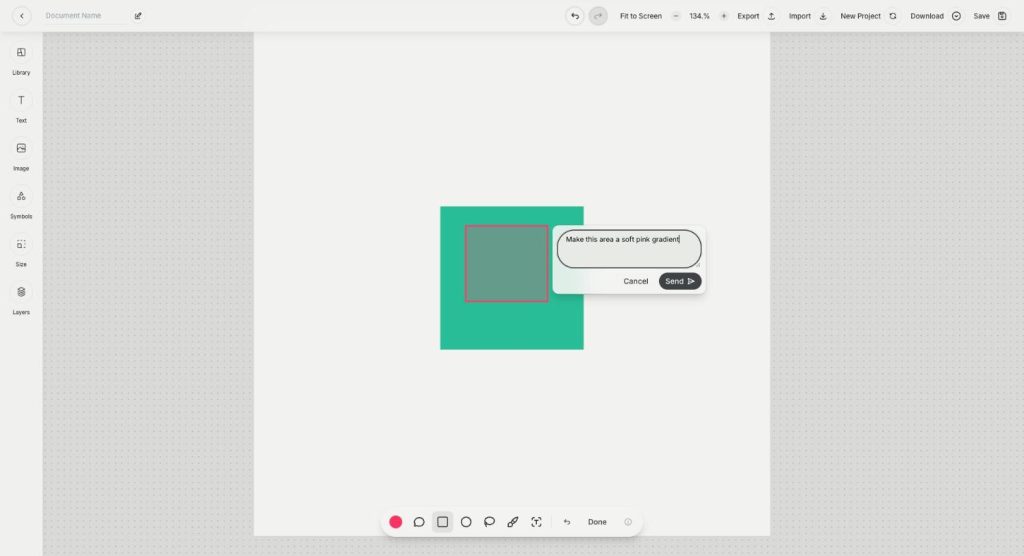
Annotation Mode is the AI inpainting tool in Qyx Creative Suite. Mark an area of the image, write what should change there, and the AI edits only that region.
How It Works
A simple three-step process, start to finish.
-
Start the design
Describe it to the AI, generate an image or open a blank template.
-
Edit on the canvas
Change text, swap images and arrange layers, or fix parts of an image with Annotation Mode.
-
Export the file
Download the design or save the project to come back to it.
Why marketers use Creative Suite
Ads and posts without waiting for a designer.
One design resized for every platform.
Precise fixes to AI images, not a new image each time.
Good to know before you start
Creative Suite is the AI design tool in Qyx. You can describe a design and let AI build it, generate an image and design around it, or start from a blank canvas. Every result stays editable, so you can change the text, the images and the layout yourself.
Three ways to start in the AI design tool
Start with AI Template turns a prompt into a full design. The example in the app reads: a clean, cozy Instagram Story for a coffee shop promotion with „Buy 1 Get 1 Free“ and bold readable text. Start with AI Image first generates a picture and then opens it for design. Start with a Blank Template gives you an empty canvas, where you pick a template from the library or a preset size.
The canvas and its tools
The editor has panels for Library, Text, Image, Symbols, Size and Layers. Size lists preset formats, for example Instagram Story/Reels at 1080×1920, Facebook Feed Post, YouTube Thumbnail, LinkedIn Feed Image or Google Leaderboard Ad. With Adaptive Resize turned on, the objects adapt to the new canvas size. You can import and export projects, download the design and save it.
AI Designer and Annotation Mode
AI Designer writes the headline, the description and the call to action, places images and icons, and sets the layout and typography. Annotation Mode is for precise changes: you select an area with a rectangle, circle or lasso, paint a mask or attach a comment, and the AI edits only that region. It also replaces text inside an AI-generated image.
When to use another tool
To create the images themselves with many models and styles, use AI Image Pro. To remove a background or upscale a photo, use AI Image Editor. To publish the finished post, schedule it in AI Social Media Suite.
Tips for an AI design tool brief
Name the format, the offer, the audience and the style in one prompt, for example the size, the discount and the brand colours. Write the exact text you want on the design in quotes. Then check every word, price and date before you export, because AI can misspell text inside images.
Questions, answered
Creative Suite is the Qyx design tool for ads, posts and banners. AI builds editable designs from a prompt, and you finish them on a canvas.
Yes. Start with AI Template, describe what you need, and AI Designer returns a design with text, images and layout.
Yes. Every design stays editable, so you can change text, swap images and move layers.
Preset sizes cover the main social networks and Google display ads, and you can also type your own width and height.
Annotation Mode lets you mark an area of an image and tell the AI what to change there. The rest of the image stays as it is.
Design your next ad in Creative Suite
From $29/month · 7-day money-back guarantee · Cancel anytime